5 Ways to Get ROI From AI Creative
49% of mobile game projects use AI creative, but only 30% see ROI growth. Here's how to measure, test and brief AI ads for players who pay.
By Aviad Dadon, Founder & CEO of Plunge Games.
Most studios I talk to brought in AI creative tools for the same reason: they couldn’t produce ads fast enough to keep up with creative fatigue. The tools fixed that, but then they saw that revenue didn’t follow.
They’re not alone. 49% of mobile game projects now use AI in creative production, but only 30% have seen ROI growth, according to the 2026 Global Mobile Game & AI Marketing Insights report from SocialPeta, Playio, and Funtap Games.
Instead of blaming the tools, look at how you measure and test what they produce. Still analyzing just CTR and IPM? That means you're scaling the ads that get clicks, even when those creatives bring in players who churn or never pay. I worked with a client who was sure cheap installs would protect his ROAS, so he kept pushing CPI down. He optimized his creatives and campaigns for the top of the funnel and got a lot of low-quality traffic. Beyond hurting his business KPIs, his product team started building features and tuning monetization around those players. They were the wrong players to build for.
Below are the five changes I'd make, in this order. The order matters: you can't judge an ad on payer conversion until you can see which players it brought in, and you can't decide how many ads to test until you know what each one needs to give you a reliable answer.
1. Build the data before you scale the output
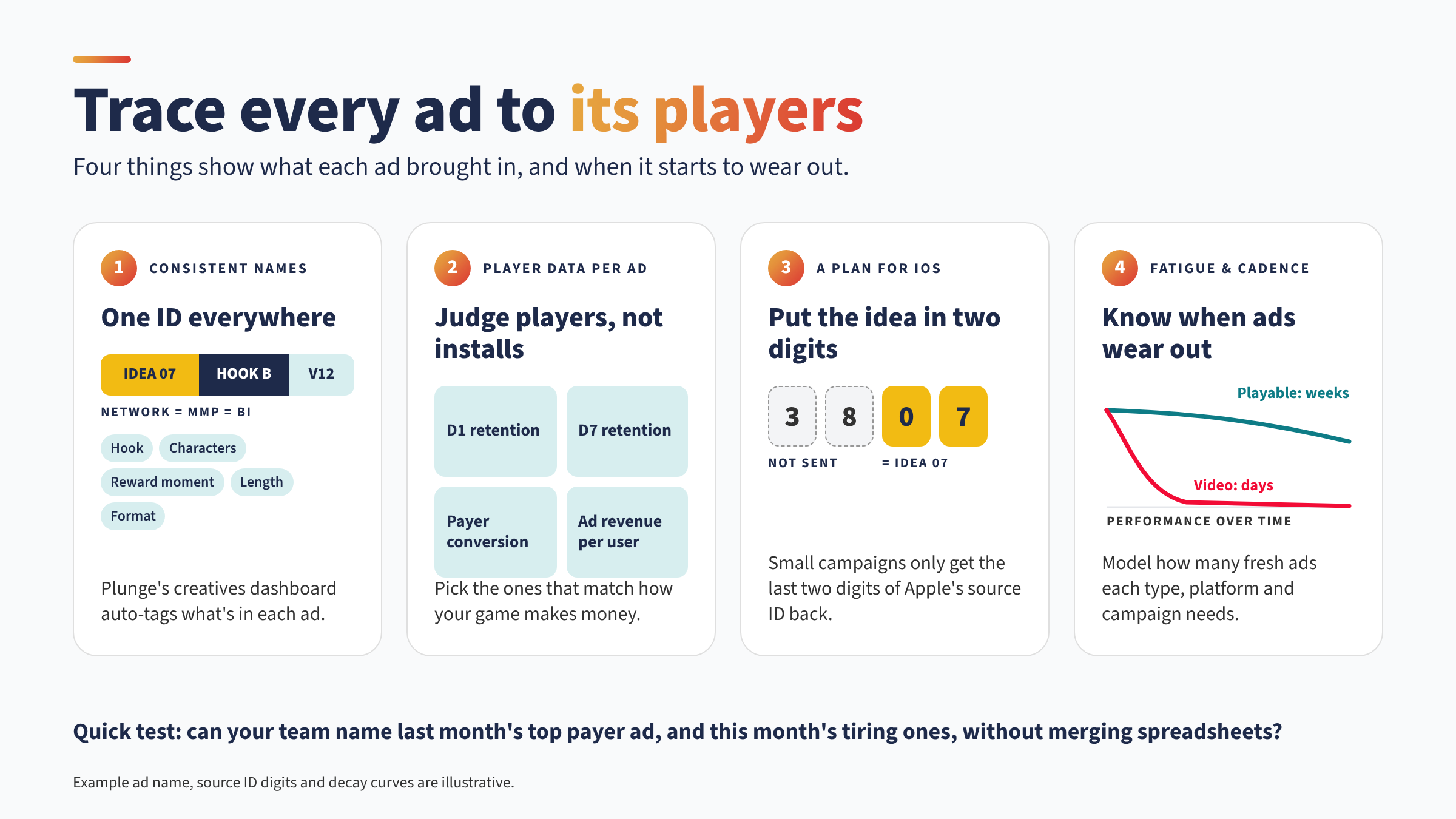
You need one report that shows each ad next to the retention and revenue of the players it brought in, and a way to see when each ad starts to wear out. That usually takes four things:
Consistent names. An ad's ID should be the same in the ad network, your MMP, and your BI tools, and the name should say which idea, hook and version it is. AI can give you 50 versions of one idea. If the name doesn't record the idea, you can't group the results later. The Plunge creatives dashboard takes most of this off your plate. It automatically tags each creative's elements, both visual (hook, characters, reward moment) and descriptive (length, format, size), so you can group results by what's actually in the ad.
Player data for each ad. D1 and D7 retention, payer conversion and ad revenue per user, depending on how the game makes money.
A plan for iOS. Apple's AdAttributionKit, and SKAdNetwork before it, uses a four-digit source ID, but smaller campaigns only get the last two digits back. Put the idea in those two digits, and even small campaigns will tell you which idea worked.
Fatigue and cadence models. Track how each ad's performance decays, then model how often you need fresh ads per ad type (video, playable, static), per platform and per campaign. A playable on one network can last weeks while a video on another burns out in days. The cadence model tells you how many new ads to brief each cycle, so your AI output matches what your campaigns actually need.
A quick test: can someone on your team tell you which of last month's ads brought in the most payers, and which of this month's are starting to fatigue, without merging spreadsheets? If not, start here.
2. Decide what a winning ad actually means
CTR and IPM can still tell you whether an ad can get installs at a cost that works, so I use them to cut the weak ones early (48-72 hours later). What they can't tell you is whether those installs were worth paying for. That takes one number from after the install, and which one depends on how your game makes money:
Monetization model | Judge winners on | Check alongside |
IAP-led | D7 payer conversion | D7 retention |
Ad-monetized | D7 ad revenue per user | D7 retention |
Hybrid | D7 total revenue per install (IAP + ads) | Payer conversion, to see where the revenue comes from |
Read that number over time, not in one fixed window. A window that's too wide blends an ad's strong first weeks with its recent decline, so fatigue stays hidden until it gets expensive. A window that's too narrow catches noise, and you can miss the ads that keep performing well. Watch how the number moves week over week, and compare each ad against its own earlier results as well as against your baseline.
That baseline should be your own game's, rather than an industry average. Benchmarks only mean something once they're calibrated to your genre. And check whether one big spender is carrying the result. A single player who spends heavily can make a small cohort look like a hit on revenue, so look at revenue without your top spenders before you scale anything. In the Plunge client dashboard, that's one toggle: it excludes whale-driven cohorts, so you can see what the rest of your players are actually worth.
3. Test different ideas before making versions of one
Because AI makes versions cheap, it's tempting to take one idea and turn it into dozens of ads with small differences. But most ideas fail. Funtap Games estimates that about 97% of the creative ideas it tests never become ads that scale. If your one idea is in that 97%, every version fails with it.
Test four different ideas with two versions each. Before each batch, write a sentence on what each idea is meant to appeal to, whether that's leveling up, collecting, beating other players or a near-miss that makes people want another try.
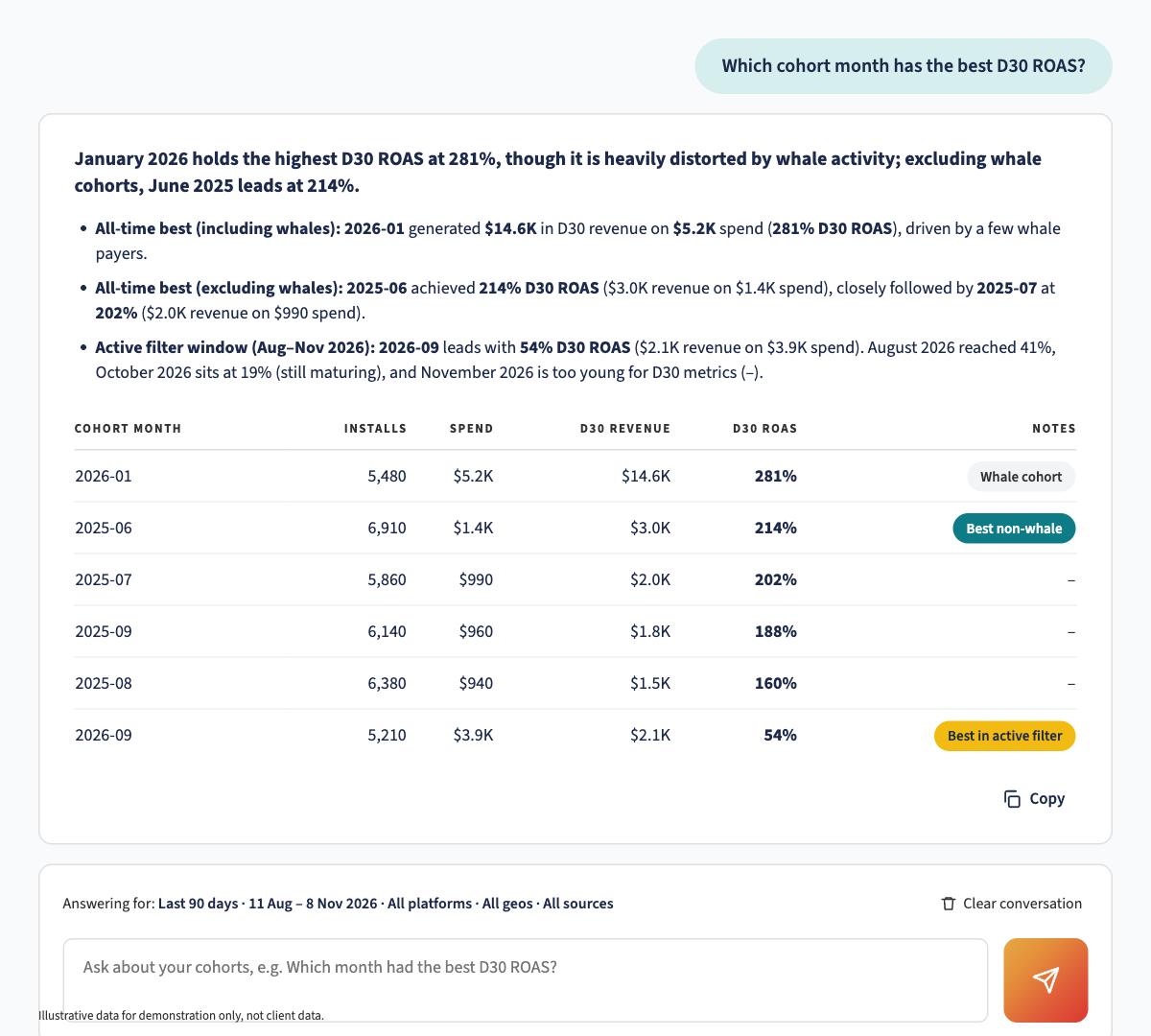
Note which key metric should move if it works. In the Plunge dashboard, you can ask in plain English how your winning creatives measured up. For example: "Which of last month's ad ideas had the highest D7 payer rate?", and get the answer from your own UA data. Once an idea wins, that's when to let AI loose on it with new hooks, characters, art styles, and translations.
4. Run tests that can give you a real answer
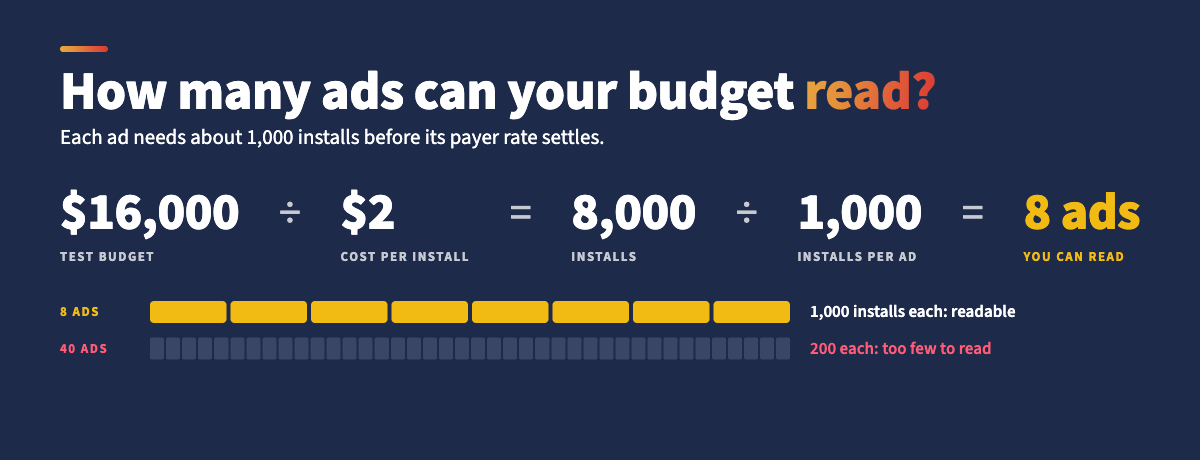
Every ad needs enough installs before its results mean anything. Spread the same budget across 40 ads instead of 8, and each one gets a fifth of the installs. That's often too few to tell whether it's bringing in payers, because so few players pay.
Say your test budget is $16,000 and your cost per install is $2. That's 8,000 installs. If an ad needs around 1,000 installs before its payer rate settles, you can test eight ads properly at once. If AI makes more ads than that, don't launch them all. Test the eight your budget can support, and save the rest for your next round.
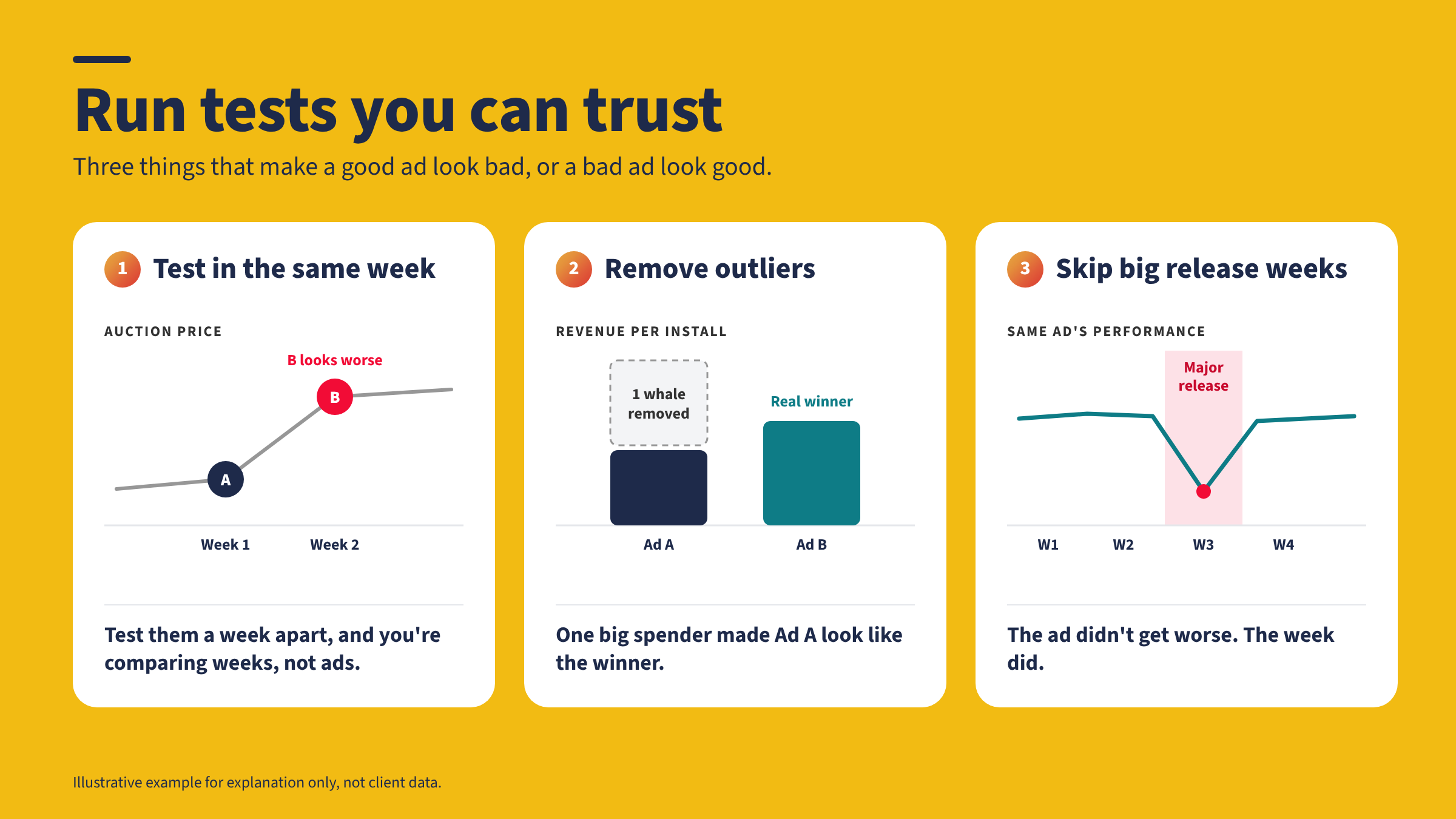
How you run the test matters as much as its size:
Run test ads in parallel, not one after another. Ads tested in different weeks face different auctions, seasonality and competition, so you end up comparing the weeks, not the ads.
Control for outliers. One big spender or one low-quality traffic source can swing a small test either way. Cap or exclude them before you call a winner.
Account for what's happening outside your game. A major release pulls player attention and pushes up auction prices across the category. Launch new ads the week GTA 6 drops, and they'll underperform however good they are. Keep big launches and holidays out of your test calendar, or read those results with that in mind.
On iOS, smaller campaigns also get less data back from Apple, which is one more reason to put more budget behind fewer ads.
5. Let your winners write the next brief
A lot of AI creative briefs are built on whatever is getting clicks, or whatever competitors are running. By this point, you have something better to work from: the ads that brought in players who stayed and paid.
To use them, you need to understand what's actually in each ad and how it affects players: the hook, the characters, the pacing, the reward moment, and which of those bring in players worth keeping. That understanding is what turns a vague prompt ("make a puzzle ad with a fail moment") into a specific one ("open on a near-miss with the main character, show the upgrade screen by second five"). Better prompts get better ads out of the same AI tools.
After each test, write down what the winning ads had in common. A note might look like this:
Winners opened on a near-miss, showed the upgrade screen in the first five seconds, and used the main character rather than a new one. Ads that led with collecting didn't beat our baseline on D7 payers.
That note becomes the next brief and the next set of prompts. Keep a list of the ideas that failed, too, so nobody tests them again six months from now.
In the Plunge creatives dashboard, this step is automatic. It connects each creative's tags to your success KPIs to show which elements work and which don't. Then it generates a brief built around the KPI you want to improve, complete with reference creatives.
Where to start this week
Pull last month's five highest-CTR ads and check each one's D7 payer rate (or D7 ad revenue per user) against your game's average, week by week. If you can't get those numbers, start with step 1. If some of your best clickers come in below average, step 2 is where you'll see results first.
Plunge clients can ask this directly in the Plunge dashboard, which answers questions about their own UA data in plain language. If you want a second set of eyes on how your creative testing connects to your economy data, let’s talk.